Timecoded Notes
Every note stamped to the exact moment it was written — shared with the whole team instantly.
CueCollab captures the timecode and scene name the moment you start typing, syncs each note across all connected devices in real time, and links directly to the matching video recording for instant review.
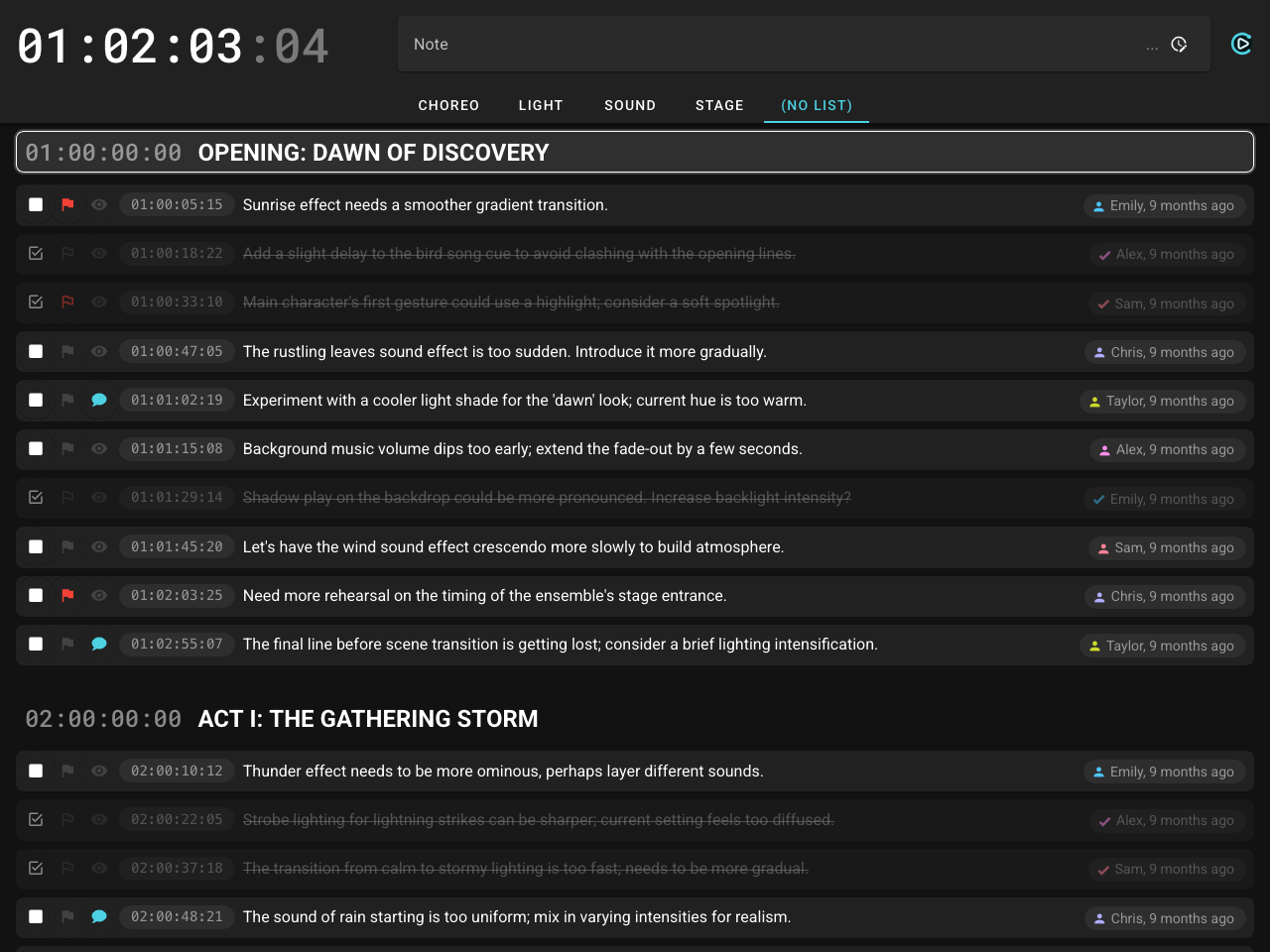
The Notepad is a shared live note-taking workspace for the entire production team. Any team member — director, lighting designer, sound engineer, stage manager — can write a note from their laptop, tablet, or phone. The moment they start typing, the current timecode and scene name are captured and locked to that note. Everyone else on the network sees it instantly.
Notes are organized into department lists (Light, Sound, Stage, etc.) so each team can filter to their own notes. The >list shortcut lets you route a note to any department without switching tabs: just type >sound the radio mic is cutting out and it goes straight to the Sound list.
Each note is linked to the matching video recording so you can jump directly to that moment in the footage. Open a note’s detail view and the video plays inline, positioned exactly where the note was written.
On mobile, Notepad Quick Entry provides a simplified view with one-tap quick note buttons — pre-configured short phrases that instantly create a timestamped note, useful when you’re moving around and need to stay hands-free.
Quick Entry also supports audio notes: tap the mic button to record a voice note, and it is saved with the same timecode and scene stamp as any other note. With transcription enabled, the audio is automatically converted to text in the background using a local, offline model — no cloud service involved.
No timecode feed? The Notepad can optionally receive cue information and time-since-cue from an external source like a lighting console — so notes are still stamped to something meaningful. Or it runs as a plain shared notepad with no setup at all.
Use Case
During a dress rehearsal, the director, lighting designer, sound engineer, and stage manager all have the Notepad open on their own devices. As the show runs, each person adds notes in real time — the director flags a blocking issue, the lighting designer notes a transition that was late, the sound engineer marks a mic level problem. Every note is stamped to the exact timecode and visible to everyone instantly. After the run, the team opens Review and works through each note against the recording, department by department.
The details that make the difference.
Every feature in CueCollab exists because someone needed it in a real production. No fluff — just the tools that actually matter when the show is running.
Tags & Department Lists
Organize cues and notes with tags and department lists. Filter to only what is relevant to your role.
Draw on Video Frames
Pause the recording in Review and draw directly on the frame — circle a problematic transition, mark a position on stage, highlight a lighting issue. Save the annotation to an existing note or create a new one.
Audio Notes & Offline Transcription
Record a voice note with one tap to stay focused on the show. The audio is saved with the note and automatically converted to text in the background, fully offline.
OSC & MIDI Control
Control CueCollab remotely via OSC or MIDI Show Control from lighting consoles, show controllers, or custom scripts.
Excel Import & Export
Export notes to Excel for sharing, or import data in bulk for easy editing. Full columns, all metadata, both ways.
HTTPS & Secure Access
Enable a built-in HTTPS server with a self-signed or custom certificate. Secure connections make audio recording available on all devices and let you access CueCollab safely over a VPN.
No Internet Required
Everything runs on the local network. No cloud dependency — the show goes on even without internet.
Browser-Based Clients
Every team member connects from their own browser — no app to install on phones, tablets, or laptops.
URL-Stored Preferences
Display layouts, filters, and preferences are saved in the URL. Bookmark a configured page and share it with the team.
Message the Whole House
Send an announcement in one tap — it appears instantly on every browser, display, and callsheet on the network.
One Tap from Your Phone
Quick Entry turns any phone into a one-tap notepad. Configure preset phrases and fire them with a tap — timestamped to the current cue and shared with the whole team instantly.
Save the Show, Restore in Seconds
Showfiles snapshot the entire production state — cues, ranges, settings, everything. Restore before the next run or hand it off to the next crew.
No Timecode? No Problem.
No TC feed? Notes are stamped to the current cue name and time-since-cue instead. The workflow stays the same — nothing breaks.
Flag It. Track It. Resolve It.
Colored flags mark notes that need urgent attention. Resolve them when actioned — who resolved it and when is tracked automatically.
Audio Standby & Call Alerts
The callsheet plays a configurable sound when a cue enters standby and again when it comes up. Eyes on stage, not the screen — the sound tells you what's next.
Auto-Reset for Repeating Shows
Running multiple performances a day? The callsheet resets to cue one automatically when timecode restarts — ready for the next audience without touching a thing.
Easy Sharing
Export note lists as plain text or Excel and send them to anyone. Recordings are standard MP4 files with timecode and cue info burned in — no special software, no account, no context lost.
Battle-Tested Since 2021
Built and refined through real productions — not vibe-coded, not prototyped. Every feature earned its place on an actual show night.
Trigger Additional Recorders at Once
Start several OBS instances or HyperDecks simultaneously — one for review, others for backup or archive. All triggered together, automatically.
Recording Autopilot
Timecode starts — recording starts. Timecode stops — recording stops, after a configurable delay. Jumps restart the file. Short accidental takes are cancelled automatically. No operator needed.
Scheduled Recording
Set recording to start and stop at a fixed time — once or weekly. No timecode needed. Useful for unattended sessions, daily archives, or any situation where the clock is the trigger.